
Devpit
Case study
All projectsA free Windows terminal app that keeps the right Claude Code, Git and GitHub account in every folder, clears node_modules, caches and Docker junk by risk, frees stuck ports, and copies big folders between two PCs on the same Wi-Fi.
- Client
- Personal project
- Type
- Open-source CLI
- Live
- devpit.zubyr.dev
Stack
- Go
- Bubble Tea v2
- Lip Gloss
- Cobra
- Win32 via golang.org/x/sys
- Git includeIf
- fastwalk
- SMB + robocopy
- TOML
- GoReleaser
The problem
A Windows dev machine needs a pit stop every few weeks, and nobody tells you that. The disk fills up. A port is stuck on something you closed yesterday. Your tools are a month behind across winget, Scoop and npm. Claude Code is signed in to the wrong account. A project folder has to get to your other PC.
Every one of those chores has an answer, and every answer is a different tool, a different website or a command you have to look up again. A cleaner here. A port killer there. A script for updates. A set of robocopy flags in a note somewhere. Each new chore wanted a new tool.
So I built one tool for all of them.
Approach
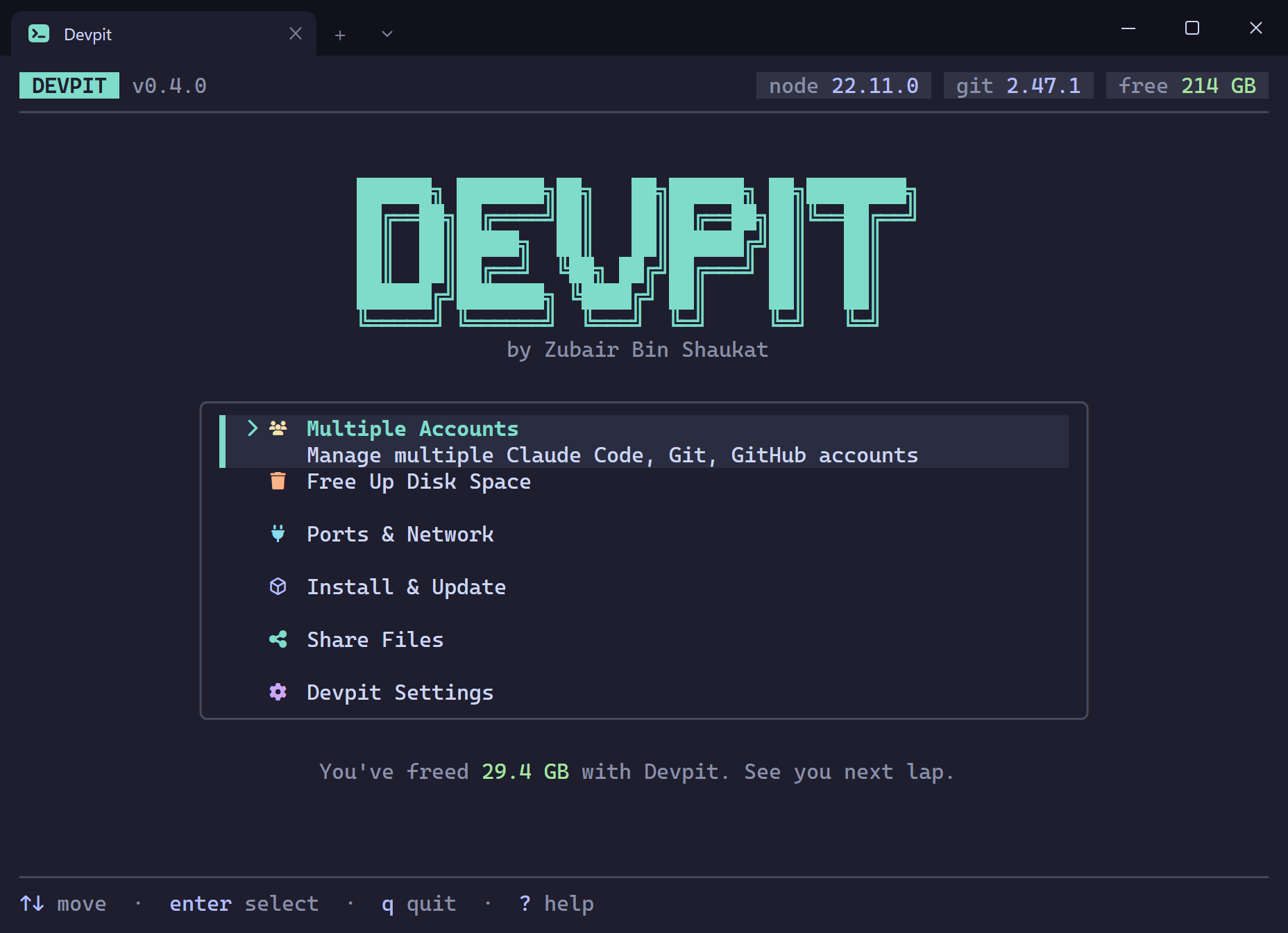
Devpit is one terminal menu, one binary, six entries:
- Multiple Accounts. The right Claude Code, Git, GitHub, Vercel, Firebase, Supabase and Cloudflare (beta) account in every folder, set once. Convex is shown and checked, not switched.
- Free Up Disk Space. One scan finds
node_modules, build folders, package caches, Docker leftovers, old Scoop versions and Windows temp, and labels each by risk. - Ports & Network. Frees a busy port in two keystrokes, lists stuck Node processes, and shows your IP, pings and flushes DNS.
- Install & Update. Installs developer apps through Scoop, winget or Chocolatey, and updates everything through every package manager it finds, in one pass.
- Share Files. Moves a big folder between two PCs on the same network, with live progress, automatic retry and Resume.
- Devpit Settings. Theme, icon font, and a never-touch list.
One tool is only worth it if you trust it with all of that, so they share the same rules. Nothing is deleted or switched without a preview, and every confirmation defaults to No. The dialog has no constructor that can produce a Yes default, so no future screen can quietly make it easier.
This was my first Go project. The thing that caught me out wasn't the language, it was the garbage collector: a Win32 call reading a buffer Go had already decided was dead. Coming from JavaScript, I'd never had to think about that.
Every safety rule is a row in docs/safety.md, and a rule isn't allowed in that table until a test pins it. There are 1,365 tests across 68 packages. Being open source means you can check that rather than believe it.
Free Up Disk Space
My laptop kept running out of disk. Not because of anything I'd saved, but because of folders I never look at: node_modules in a dozen old projects, the npm cache, Docker build layers, old versions of every tool Scoop had ever updated. Finding them by hand takes an hour, so you don't.
There are cleaners for this. I stopped trusting them after reading how a popular one worked: it walked into junctions and symlinks, so on Windows it could follow a shortcut out of node_modules and delete real source code. A tool that frees disk space has one job it must never get wrong.
Every row Devpit finds gets a word: Safe, Review or Careful. Safe means it rebuilds itself and the row is pre-ticked. Careful means you have to type DELETE.
Some rules I only understood by trying to break my own tool:
- A folder is junk only when its marker sits beside it.
node_modulescounts whenpackage.jsonis next to it,targetwhenCargo.tomlis. A folder callednode_moduleson its own is just a folder. - Junctions and symlinks are leaves. Devpit never walks through one. That's the bug that made other cleaners eat source code.
- A project you touched in the last week is never pre-ticked, even when it's Safe.
- The marker is checked again in the second before the delete, not just during the scan.
Deleting starts with a rename. The folder becomes node_modules.devpit-a3f91c2e, with a small JSON marker inside naming where it came from. The rename is instant and atomic, so the space reads as freed straight away, a locked folder announces itself before anything is removed, and a crash halfway through leaves a clearly-dead folder rather than a half-empty node_modules that still looks like it works. A later run finishes the job.
Review and Careful items skip all that and go to the Recycle Bin instead. Slower, and reversible, which is the point.
The right account in every folder
Multiple Accounts is the first entry on the menu. Anyone with a work GitHub and a personal one, two Claude Code subscriptions and a client's Vercel team has the same chore: sign out, sign in, or push from the wrong identity. You tell Devpit once which account a folder uses, and claude, git, gh, vercel, firebase, supabase and wrangler use it there by themselves.
For most tools that's a shim. Devpit copies a small Go program as claude.exe, gh.exe, vercel.exe and so on, and puts that folder first on your user PATH. On every call the shim finds the nearest folder rule for that tool, applies the account to that one process (Claude Code gets its own CLAUDE_CONFIG_DIR), starts the real tool and passes its exit code back. A rule on C:\Work\client-api beats one on C:\Work, one tool at a time, so Git can follow one rule while Claude Code follows another. Git needs no shim: Devpit writes includeIf rules instead.
I chose shims over a PowerShell prompt hook because a hook never runs for an AI agent or a VS Code task, and those are the processes that push your code for you. The cost is a shim that has to start other people's tools correctly. Most of them arrive from npm as .cmd files, and Go can't pass arguments to those safely.
Every change gets a preview in plain words, the default answer is No, and u undoes it. Devpit never stores a token, because each tool keeps its own login. If the shim can't read its rules file, it starts the real tool untouched and prints one warning line, so a broken Devpit never stops a tool from running. Without a person at the terminal, a change needs --yes, so an AI agent can't switch an account until you've agreed.
It has limits. Rules apply to what you start in a terminal and to scripts and agents started there. Desktop apps and editor extensions keep their own login, and a PowerShell function with a tool's name runs before any shim. devpit accounts verify checks all of that before you push or deploy.
Sharing big folders over Wi-Fi
Share Files copies a large folder, a game or a project with its assets, between two Windows PCs on the same Wi-Fi or office network. Windows can already do this, but only after you switch the network from Public to Private, turn on a firewall rule, create a share and a login, and remember which robocopy flags let a copy pick up again after the Wi-Fi drops.
On the PC that shares, Devpit asks for admin once and does all of that in front of you. The share is read-only, and the login is a temporary one made for this share alone, never your own password; it expires by itself after 48 hours. The card it shows has the address, user and password, plus a net use and a robocopy line for a PC that doesn't have Devpit. Stopping, or quitting, puts everything back: the share, the login, the network setting, and only the firewall rule Devpit turned on itself.
On the PC that receives, nothing is copied until Devpit has measured the folder and checked the exact size against the free space, and against FAT32's 4 GB file limit. Then it runs robocopy with 16 files at a time and shows the speed and time left. If the other PC stops answering, it waits and carries on. If you close it, Resume skips the finished files and continues the half-copied ones.
It's for a network you trust: unless Windows is set to require SMB encryption, the files cross it unencrypted, and the docs say so plainly.
Outcome
It's the one tool I open now instead of hunting for six. One binary, no runtime, and the same Windows-first tooling habit that made me build it in the first place.
There are no download numbers here and I'm not going to invent any. The source is at github.com/zubairbinshaukat/devpit.
More from the build
Figs. 2–4 — 3 more screens
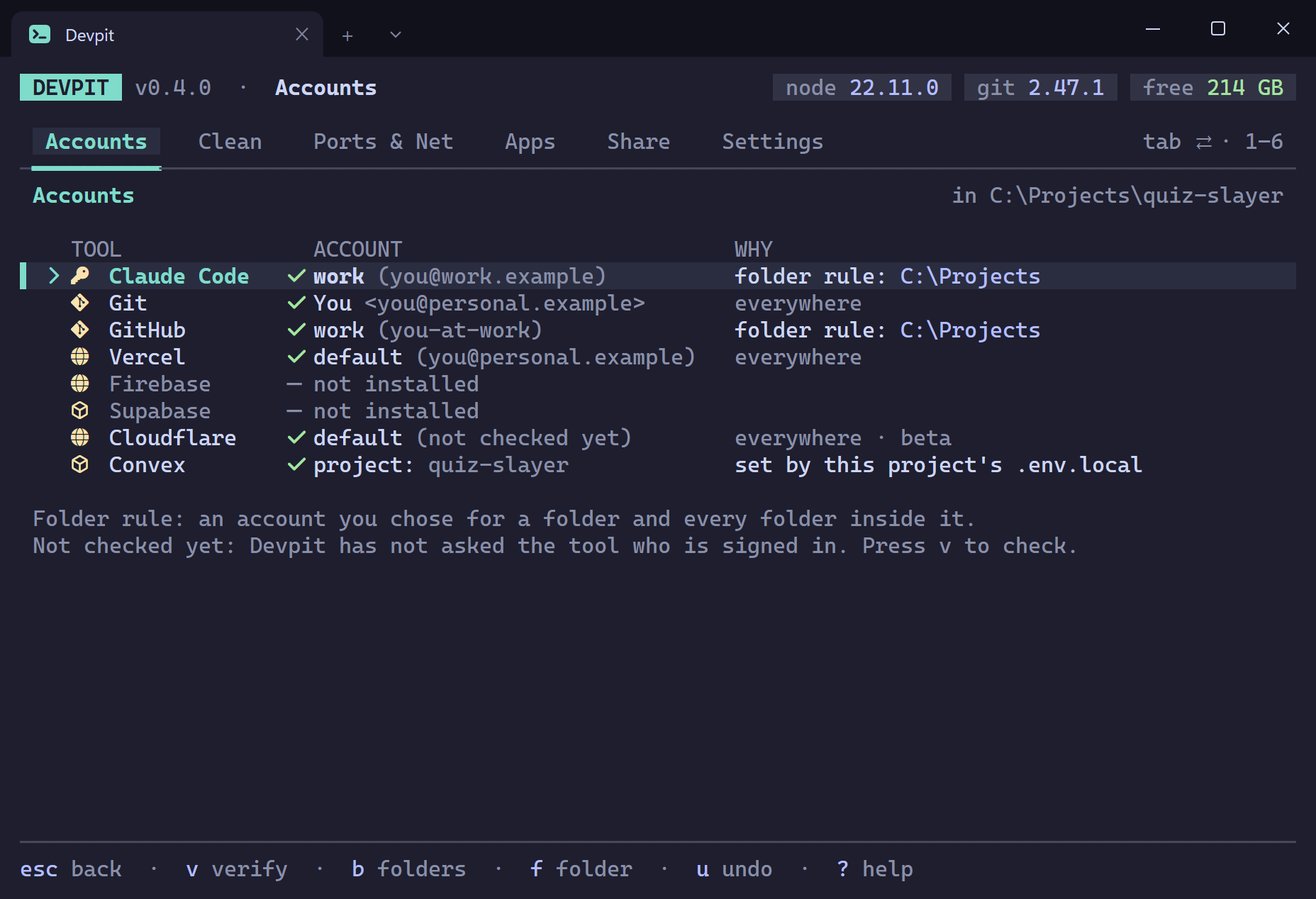
Fig. 2 — Accounts, for the folder I'm standing in. Each row says which account the tool uses here, and why. Sample data. 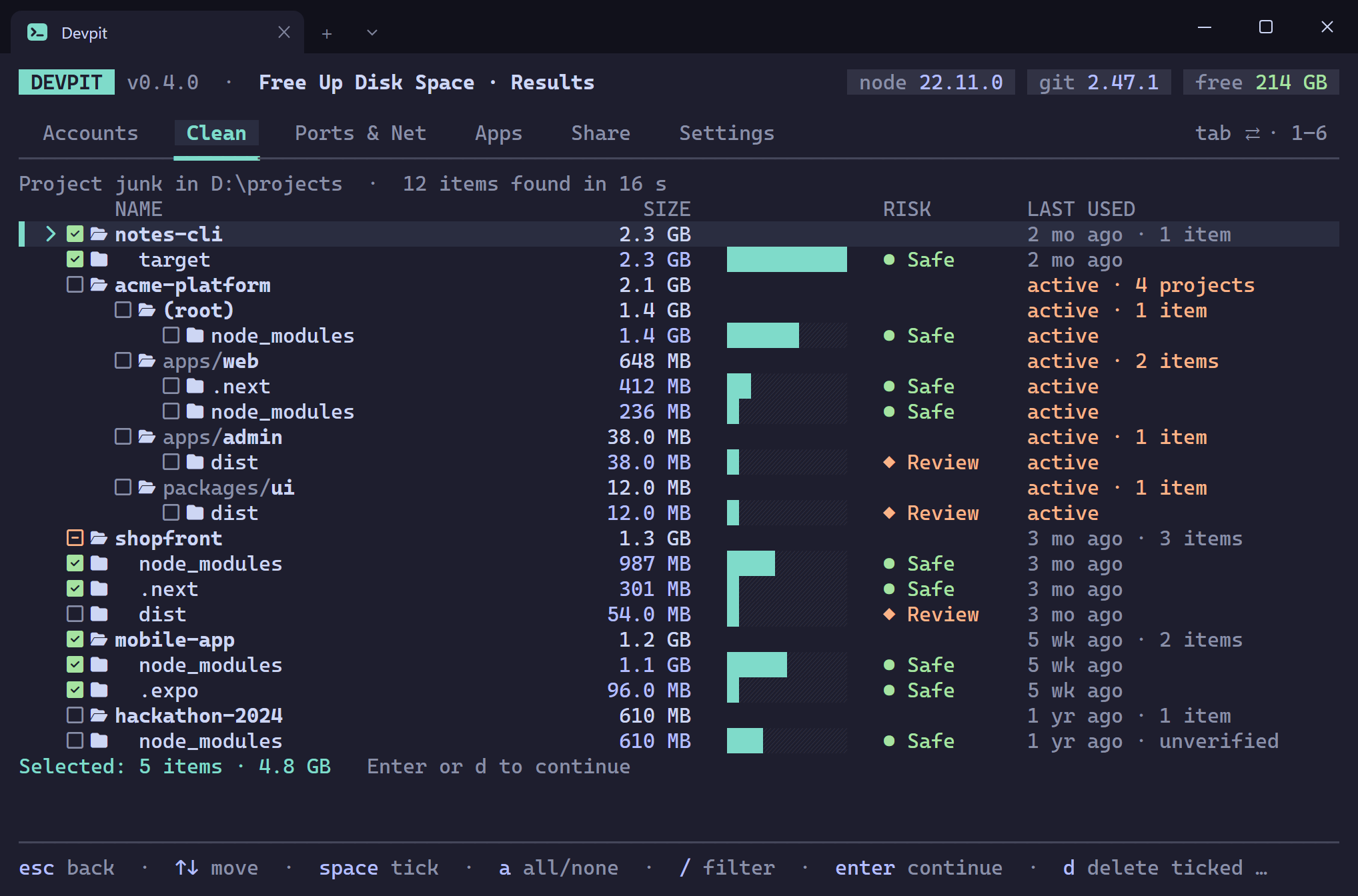
Fig. 3 — The scan result. Every row carries a risk word and a size, and anything from an active project is left unticked. Sample data. 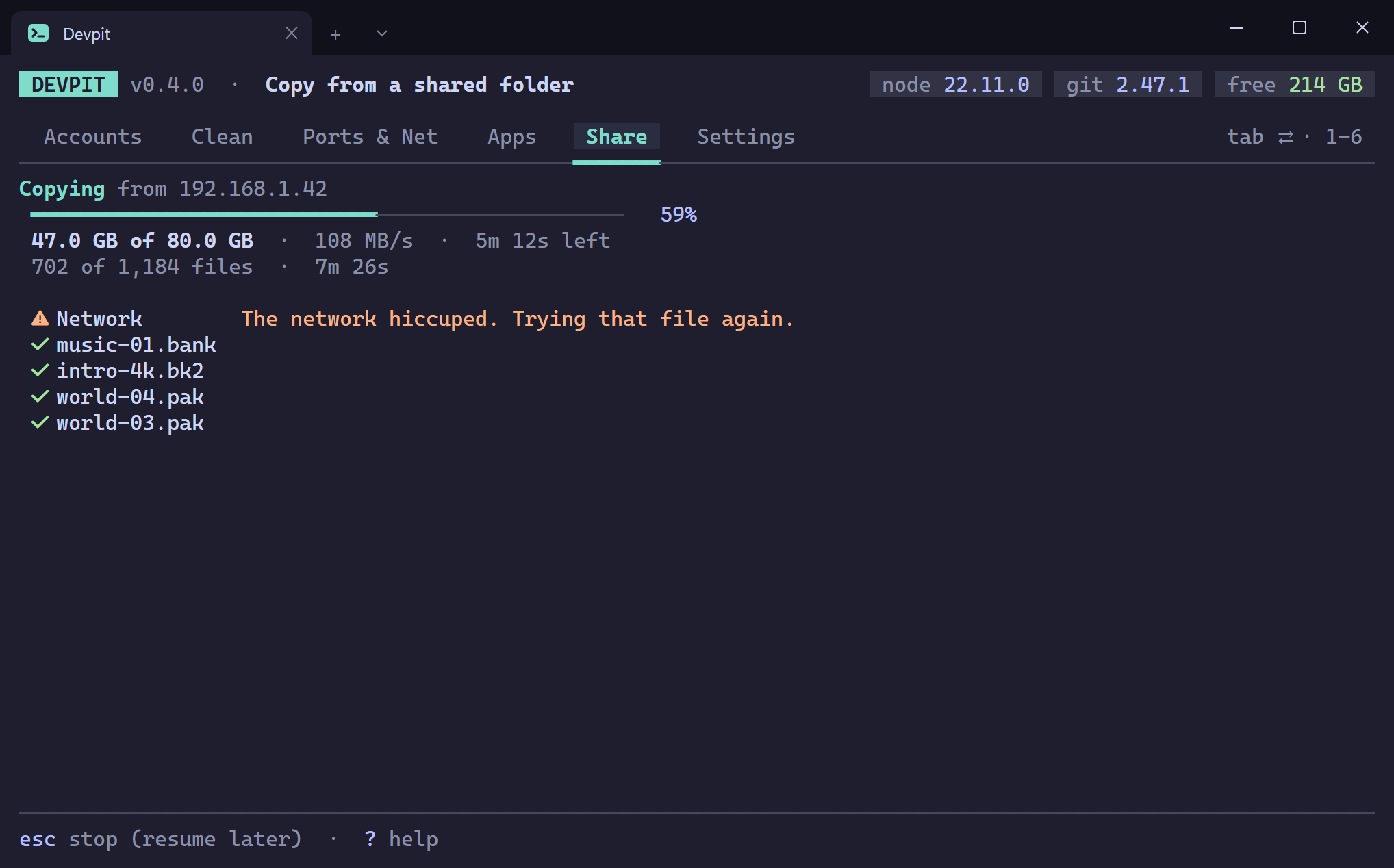
Fig. 4 — Share Files, copying 80 GB between two PCs on the same Wi-Fi. When the network drops a file, Devpit tries it again by itself. Sample data.